Blog

  • AWS Transit Gateway: 7 Awesome Benefits for Cloud Networks

    AWS Transit Gateway is one of the most important services to understand if you want to build scalable AWS networking without turning your cloud architecture into a maze of manual connections. Many AWS environments start simple, with one or two VPCs and maybe a VPN back to on-premises infrastructure. But the moment your organization grows, launches multiple environments, or separates workloads across accounts, networking complexity can explode.

    That is exactly where AWS Transit Gateway becomes valuable. Instead of connecting everything to everything else individually, it gives you a centralized networking hub that simplifies connectivity across Amazon VPCs, site-to-site VPNs, Direct Connect, and even multiple AWS accounts. If you are preparing for AWS certification, designing enterprise cloud architecture, or simply trying to clean up an overly complicated network, understanding AWS Transit Gateway can save you from expensive mistakes later.

    This article transforms the core ideas from the original guide into a deeper, more practical resource with an architecture-first perspective. Rather than just explaining what the service does, we will look at why it matters, where it fits, when it is the right tool, and how to avoid common design pitfalls. The source transcript focuses on AWS Transit Gateway as a solution for complex network topologies and hybrid connectivity, including route control, VPN scaling with ECMP, and cross-account networking.
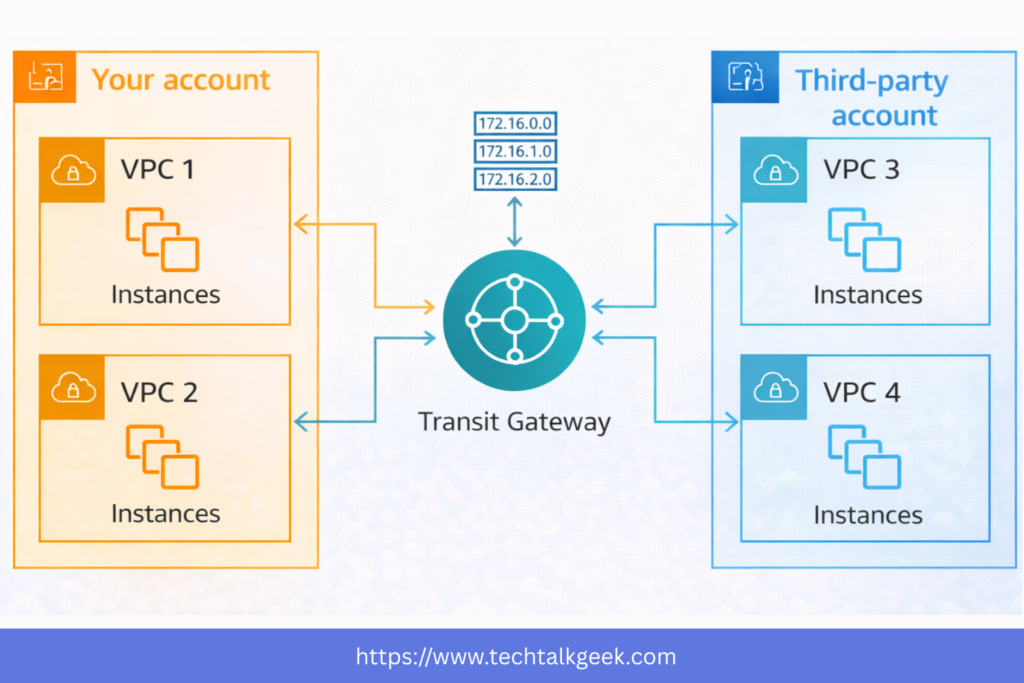
    aws transit gateway architecture connecting multiple VPCs and on-premises networks
    AWS Transit Gateway simplifies complex networking with a centralized hub-and-spoke design.

    What Is AWS Transit Gateway?

    AWS Transit Gateway is a regional network transit hub that allows you to connect multiple VPCs and on-premises networks through a single central gateway. Think of it as a cloud router designed for scale. Instead of building dozens of one-to-one connections between VPCs or manually managing overlapping network relationships, you connect each network attachment to the transit gateway and manage traffic centrally.

    At a high level, this changes your architecture from a web of point-to-point connections into a hub-and-spoke model. That shift may sound small, but operationally it changes everything. Network management becomes cleaner, routing becomes more consistent, and scaling your AWS environment becomes much easier.

    This is especially useful in organizations that run multiple VPCs for development, production, testing, shared services, logging, or security segmentation. It is also highly relevant in hybrid cloud environments where AWS must communicate with a corporate data center using VPN or Direct Connect. The original transcript emphasizes that AWS created Transit Gateway specifically to solve this growing topology problem when organizations start connecting many VPCs, VPNs, and Direct Connect resources together.

    Why Traditional AWS Networking Becomes a Problem

    A lot of AWS networking pain starts with a design that seemed reasonable at first. You launch one VPC for your application, another for staging, and maybe a third for analytics. Then you need them to talk to each other. So you add VPC peering. Later, your company adds a second AWS account, and then an on-premises office wants access too. Soon, you are juggling peering relationships, route tables, VPN attachments, and access rules scattered across multiple environments.

    This becomes hard to manage for three reasons. First, point-to-point connectivity does not scale cleanly. Every new network can create several new relationships. Second, routing logic becomes fragmented across multiple places. Third, visibility suffers. It becomes difficult to answer simple but critical questions, such as which network can reach production databases, which account has on-prem access, or whether staging accidentally has broader connectivity than intended.

    AWS Transit Gateway addresses this by centralizing the network core. Instead of thinking in terms of one-off links, you think in terms of attachments and controlled routing domains. That makes your architecture more intentional and much easier to grow.

    This is where many teams realize that AWS Transit Gateway is not just a connectivity tool. It is a governance tool. It gives you a cleaner way to structure network access as your environment evolves.
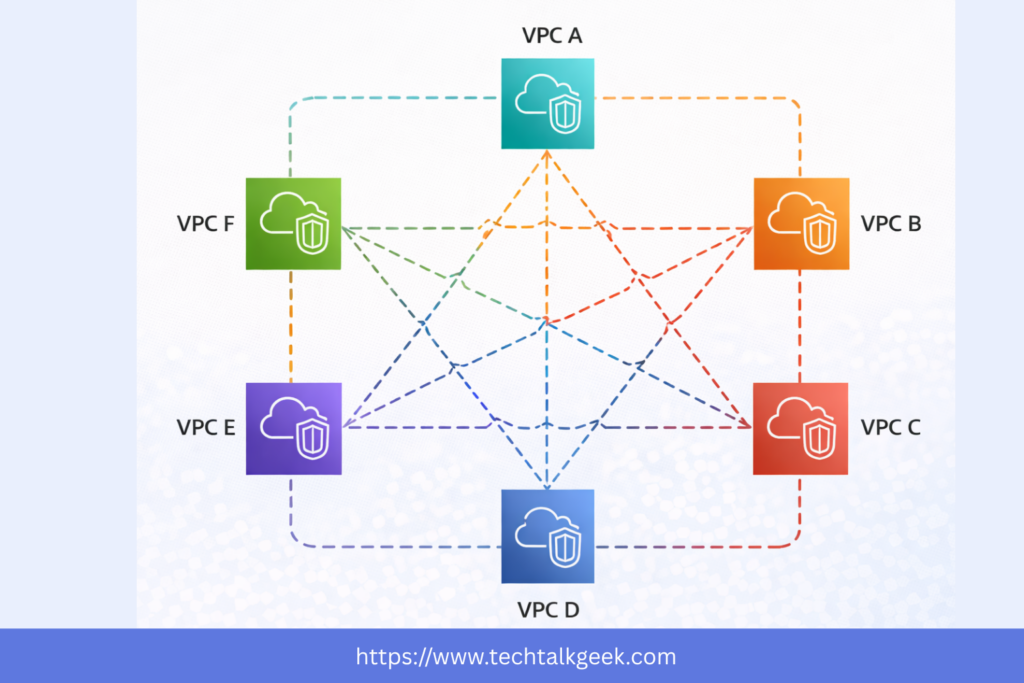
    aws transit gateway compared with complex VPC peering mesh architecture
    A transit gateway reduces the complexity of managing many one-to-one VPC connections.

    How AWS Transit Gateway Actually Works

    At the center of the design is the transit gateway itself. You attach VPCs to it, and those VPCs can then communicate with other attached networks depending on how your routing is configured. You can also attach site-to-site VPN connections, Direct Connect gateways, and even peer transit gateways across regions.

    That means a single AWS Transit Gateway can become the networking core for a wide range of cloud and hybrid traffic patterns. For example, a production VPC, shared services VPC, security inspection VPC, and logging VPC can all be attached to the same central hub. If you also need your on-premises data center to reach those environments, you can connect it through VPN or Direct Connect without building separate connectivity for every VPC.

    One of the most important conceptual shifts here is that connectivity is not automatically equal to unrestricted access. Just because networks are attached to the same AWS Transit Gateway does not mean they should all communicate freely. The real power of the service comes from how you manage traffic between those attachments.

    That distinction matters a lot in real-world architecture. Good cloud networking is not just about making things reachable. It is about making the right things reachable and nothing more.

    AWS Transit Gateway for Hybrid Cloud and Multi-Account Architectures

    One of the strongest use cases for AWS Transit Gateway is hybrid cloud. Many businesses are not fully cloud-native. They still run legacy systems, internal tools, or compliance-sensitive workloads in a corporate data center. In those cases, AWS is not replacing the data center overnight. It is extending it.

    This is where Transit Gateway becomes strategically useful. Instead of building separate VPNs or separate private connectivity into each VPC, you can connect your on-premises environment to AWS Transit Gateway and allow controlled access to multiple VPCs from one central point. That simplifies operations and reduces the number of moving parts in your network design.

    It also becomes highly valuable in multi-account AWS environments. Modern AWS best practices often recommend separating workloads into different accounts for billing, security, and operational isolation. But once you do that, you still need secure communication between some of those environments. AWS Transit Gateway gives you a practical way to share connectivity across accounts without building a tangled web of custom interconnections.

    You can share a transit gateway across accounts using AWS Resource Access Manager, and that you can also connect a Direct Connect Gateway into Transit Gateway to make private connectivity available across multiple VPCs and accounts.

    For official AWS documentation on this architecture, you can reference the AWS Transit Gateway documentation here: AWS Transit Gateway Documentation.

    You can also review AWS Resource Access Manager here: AWS RAM Overview.

    If you want AWS Direct Connect: AWS Direct Connect
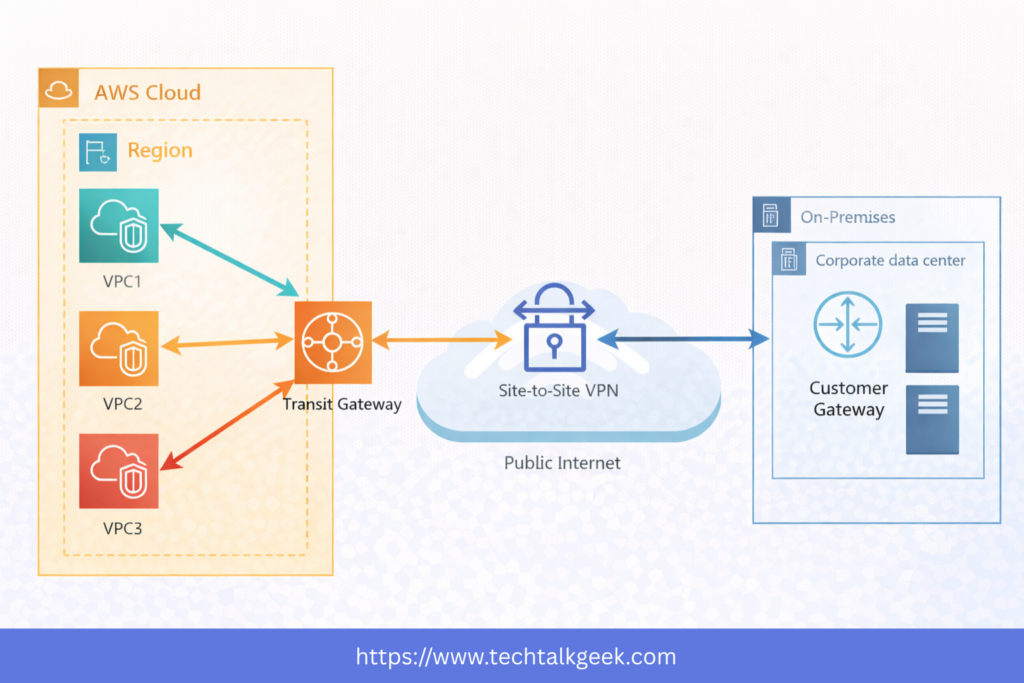
    aws transit gateway hybrid cloud design with VPN and Direct Connect
    AWS Transit Gateway helps extend secure connectivity between AWS and on-premises environments.

    Routing, Security, and Traffic Control in AWS Transit Gateway

    This is the part many beginners underestimate. AWS Transit Gateway is not just about plugging networks together. It is about controlling how traffic flows between them.

    The core mechanism for that control is the transit gateway route table. These route tables determine which attachments can send traffic to which destinations. This allows you to create segmentation policies inside your AWS network backbone.

    For example, you may want your shared services VPC to be reachable by both development and production. Still, you do not want development and production to communicate directly with each other. With AWS Transit Gateway route tables, that becomes possible without building awkward workarounds.

    This also makes AWS Transit Gateway useful from a security architecture perspective. You can isolate environments, control east-west traffic, and build centralized inspection or egress patterns. In mature cloud environments, networking and security design increasingly overlap, and Transit Gateway often sits right in the middle of that intersection.

    The original guide points out that route tables inside Transit Gateway are what allow you to define who can talk to what and to maintain control over traffic paths across connected environments.

    A common mistake is assuming Transit Gateway is a plug-and-play “connect everything” service. In reality, the best designs are intentional. Your routing should reflect your application boundaries, trust zones, and operational responsibilities.

    AWS Transit Gateway and VPN Performance with ECMP

    One of the more advanced and valuable AWS Transit Gateway use cases involves improving VPN throughput using Equal-Cost Multi-Path routing, commonly known as ECMP.

    This is where AWS Transit Gateway becomes more than just a convenience. It can also become a performance enabler.

    In a standard AWS site-to-site VPN setup connected directly to a Virtual Private Gateway, your VPN connection includes two tunnels. Still, the design is limited in how traffic uses them. With AWS Transit Gateway, ECMP allows traffic to be distributed across multiple equal-cost paths, which can improve throughput and resilience when configured properly.

    This matters for organizations that rely on VPN as a practical alternative to Direct Connect, especially during migration phases or in environments where private connectivity is not yet available. Instead of being restricted to a single narrow path into one VPC, you can terminate VPN into AWS Transit Gateway and extend controlled access across multiple attached VPCs.

    VPN connecting to the Transit Gateway can leverage ECMP, and multiple VPN attachments can be used to increase throughput to AWS, which is something not achieved the same way when connecting directly into a single VPC through a Virtual Private Gateway

    That said, there is an important practical note here: more throughput often means more cost. AWS Transit Gateway charges for both attachments and data processing, so architectural simplicity and bandwidth gains should always be weighed against your traffic profile.

    For deeper technical reference, AWS provides official guidance on ECMP and VPN design here: AWS Site-to-Site VPN Tunnels.
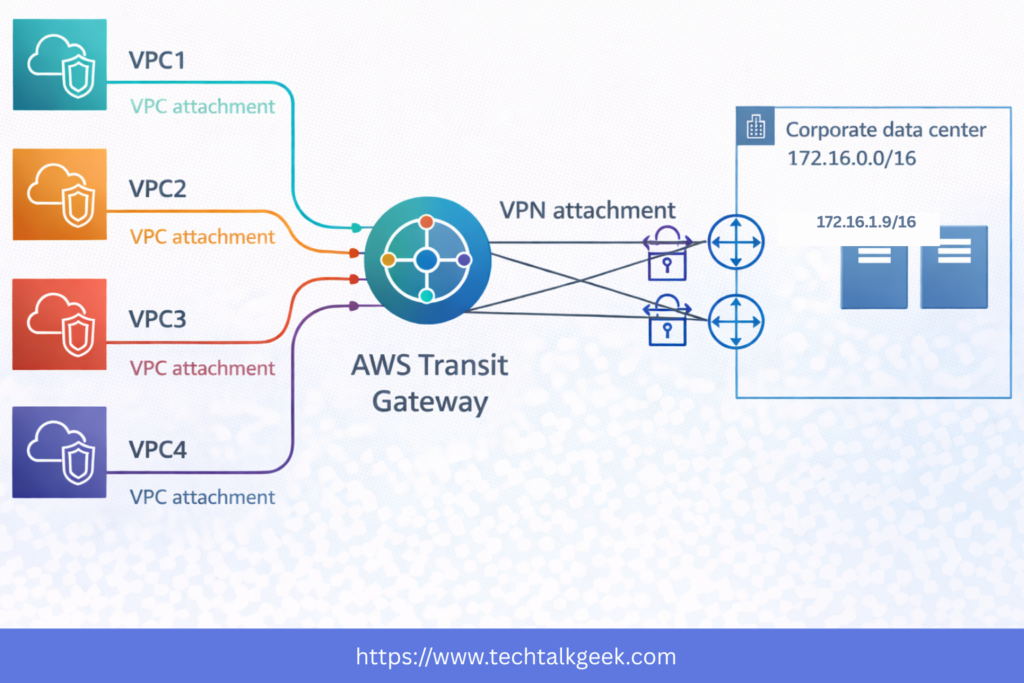
    aws transit gateway ECMP VPN architecture for higher throughput
    ECMP with AWS Transit Gateway can improve VPN throughput across multiple tunnels.

    When to Use AWS Transit Gateway vs VPC Peering

    This is one of the most useful design questions you can answer early.

    If you only have two or three VPCs and their connectivity requirements are simple, VPC peering may be enough. It is straightforward, low-friction, and often sufficient for small architectures. But the moment your network begins to grow, AWS Transit Gateway starts becoming the cleaner long-term option.

    The tipping point usually appears when one or more of the following become true: you need centralized routing, you have hybrid connectivity, you want multi-account networking, or you need structured segmentation between environments. Those are all signs that you are no longer dealing with a “small network” problem.

    In practice, VPC peering is often tactical. AWS Transit Gateway is strategic.

    That distinction can save teams from painful re-architecture later. Many environments start with peering because it feels simpler, but then outgrow it quickly. If you already know your AWS footprint will expand, adopting AWS Transit Gateway earlier can reduce future migration complexity.

    Common Mistakes to Avoid

    One of the biggest mistakes teams make with AWS Transit Gateway is deploying it without a routing strategy. The service itself is not difficult to create, but a poorly planned route table design can quietly introduce over-permissive access, asymmetric traffic paths, or operational confusion later.

    Another common issue is treating all VPCs as equal peers. In reality, not every environment should have the same network trust level. Production, development, security tooling, shared services, and logging often need different communication patterns. If you ignore that and connect everything with broad access, you lose one of the biggest advantages of AWS Transit Gateway.

    A third mistake is overlooking cost. AWS Transit Gateway is powerful, but it is not a free architecture. You pay for attachments and data processing, which means heavy east-west traffic or centralized traffic inspection patterns can become expensive if not planned carefully.

    Finally, some teams misunderstand its regional nature. AWS Transit Gateway is a regional service, which means cross-region design requires additional planning, such as inter-region transit gateway peering. The transcript mentions that Transit Gateway is regional but can work across regions through peering, which is an important detail for global architectures.

    Good design with AWS Transit Gateway is not about using every feature. It is about using the right subset of features to match your operational reality.

    Final Thoughts

    AWS Transit Gateway is one of those services that looks simple on the surface but becomes incredibly valuable as your architecture grows. At first glance, it is just a central networking hub. But in real environments, it becomes the foundation for scalable cloud networking, hybrid connectivity, multi-account communication, and security-aware traffic control.

    If you are building beyond a basic AWS setup, learning AWS Transit Gateway early will pay off. It helps you move away from fragile one-off connections and toward a cleaner, more intentional network architecture. And if you are preparing for AWS certification, it is also one of those services that shows up in scenario-based questions because it solves a very real architectural problem.

    The original transcript gives the core exam-focused explanation: AWS Transit Gateway simplifies complex AWS networking, supports transitive connectivity between VPCs and hybrid resources, enables route-based control, works with Direct Connect and VPN, supports IP multicast, and can improve VPN throughput using ECMP.

    In practice, though, its real value is even bigger than the exam. It gives you a way to scale your AWS network without scaling your complexity at the same time.
  • AWS Direct Connect Explained: 7 Essential Concepts for Gateway, VPN, VIFs & Hybrid Architecture

    AWS Direct Connect Explained: 7 Essential Concepts for Gateway, VPN, VIFs & Hybrid Architecture

    If you think AWS Direct Connect is just a private cable to AWS, that’s exactly where expensive architecture mistakes begin. In the real world, Direct Connect is not simply about speed. It’s about deciding when private connectivity actually solves a business problem, when it adds unnecessary complexity, and when a simpler option, like a VPN or even the Public Internet, is the smarter choice. That’s the difference between memorising AWS services and actually designing systems that work in production.

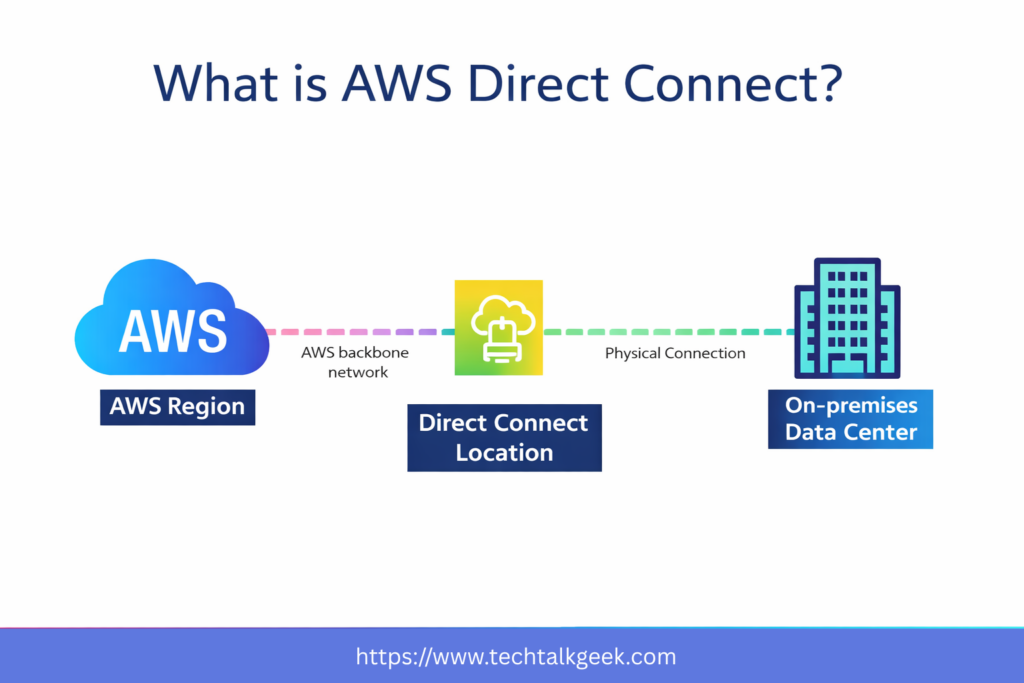
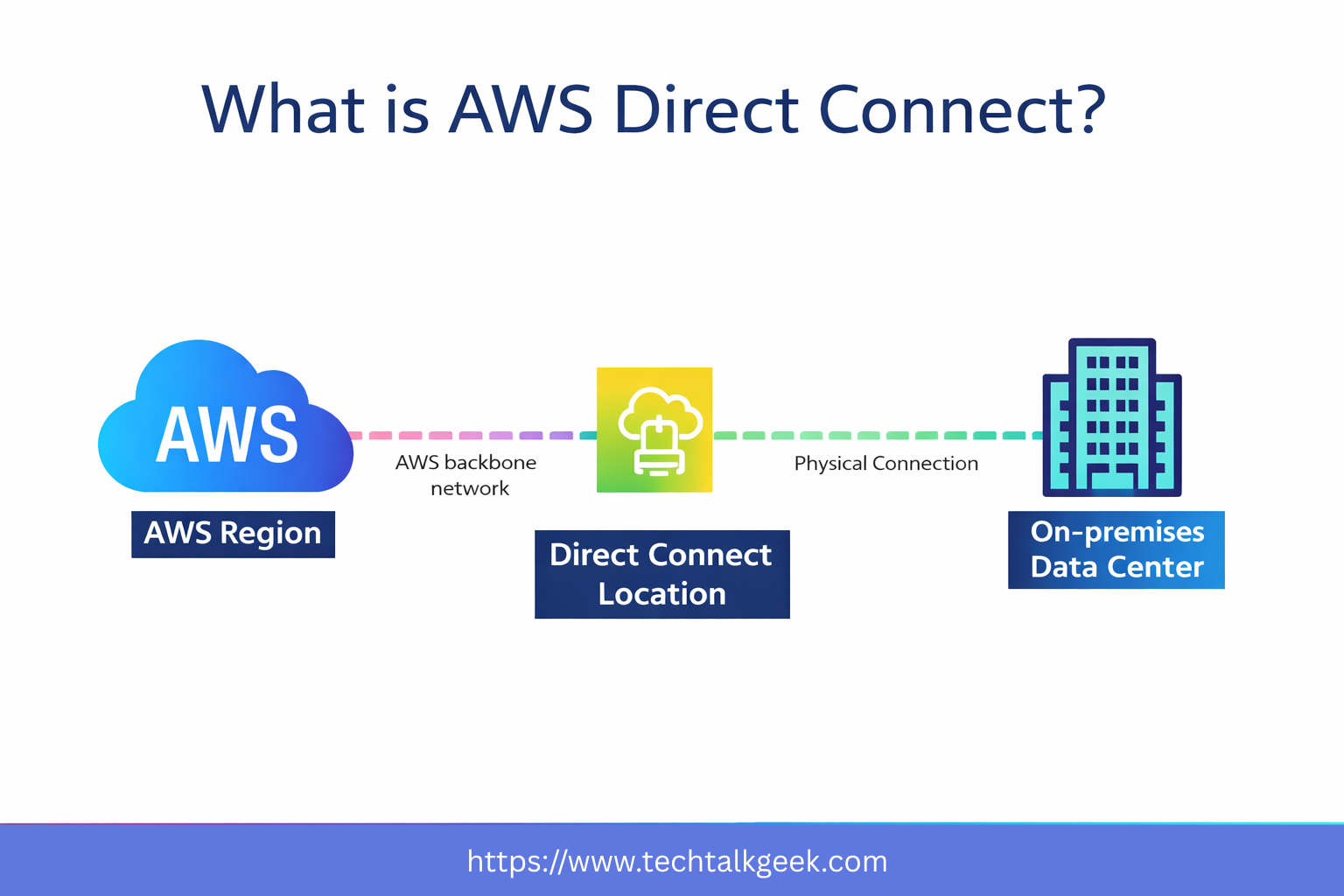
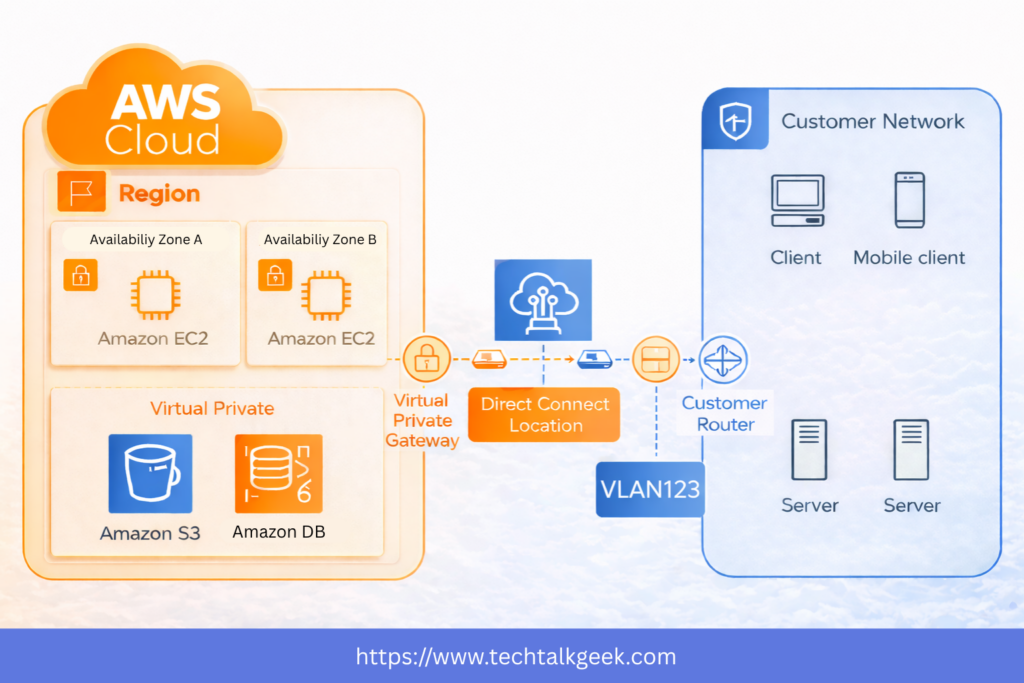
    AWS Direct Connect overview diagram showing private connectivity between on-premises infrastructure and an AWS VPC
    AWS Direct Connect provides a dedicated private connection between on-premises infrastructure and AWS.

    In this guide, you’ll learn the 7 essential concepts you need to understand AWS Direct Connect truly. By the end, you won’t just know what it is — you’ll know when to use it, when not to use it, and how to think like a cloud architect instead of just an exam candidate.

    Concept 1: AWS Direct Connect Is About Dedicated Connectivity, Not Just Speed

    The first thing to understand is that AWS Direct Connect is a dedicated private network connection between your on-premises environment and AWS. Instead of relying on the public Internet, your traffic travels through a more controlled and predictable path. If you want the official AWS definition and technical setup details, you can also refer to the AWS Direct Connect documentation.

    What is AWS Direct Connect
    AWS Direct Connect

    That sounds simple, but this is where many people misunderstand the service. Direct Connect is not just a “faster internet connection to AWS.” Its real value comes from consistency, stability, and controlled connectivity. Organisations use it because they want more reliable network behaviour for hybrid cloud workloads, not just raw bandwidth.

    This matters most when businesses are running applications that depend on steady communication between on-premises systems and AWS resources. A company moving large data sets, syncing enterprise databases, or running hybrid applications may care much more about predictable throughput and lower variability than speed alone.

    So if you want the simplest mental model, think of AWS Direct Connect as a premium dedicated lane between your network and AWS, designed for workloads where consistency matters.

    Concept 2: Direct Connect Solves Hybrid Cloud Problems

    AWS Direct Connect becomes relevant when organisations are running hybrid environments. That means part of the infrastructure still lives on-premises, while another part runs in AWS.

    This is extremely common in the real world. A company may have legacy applications in a corporate data centre, internal databases hosted locally, and newer cloud workloads inside AWS. Once that happens, networking becomes a critical design problem. Those environments must communicate reliably, securely, and efficiently.

    This is where Direct Connect is valuable. It provides organisations with a more stable way to connect their internal infrastructure to AWS. Instead of relying completely on internet-based paths, they can establish a dedicated connection for business-critical traffic.

    That’s why Direct Connect is best understood as a hybrid architecture tool. It is not just an AWS networking feature. It is a way to support enterprise systems that span both on-premises infrastructure and the cloud.

    Concept 3: Private VIF and Public VIF Serve Two Different Purposes

    One of the most important concepts in AWS Direct Connect is understanding virtual interfaces, or VIFs.

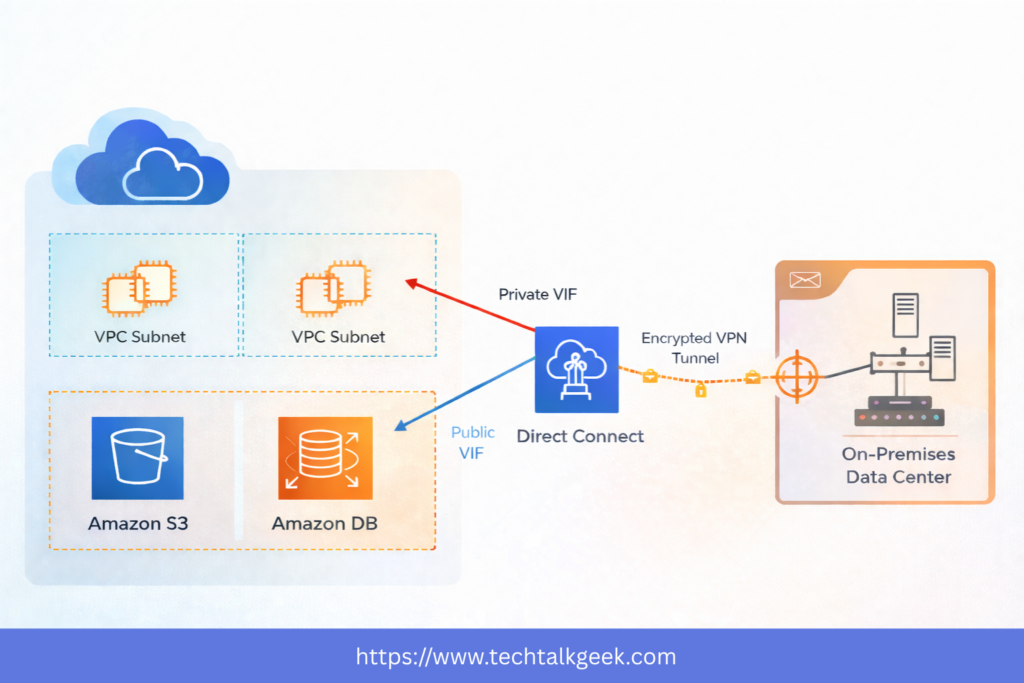
    AWS Direct Connect private VIF vs public VIF diagram showing access to VPC resources and AWS public services
    Private VIF connects to VPC resources, while Public VIF connects to AWS public services such as Amazon S3.

    A VIF is essentially the logical path that determines what type of AWS traffic you want to send through the Direct Connect connection. This matters because not all AWS traffic is the same.

    A Private VIF is used when your on-premises environment needs to access private resources inside your AWS VPC. This includes things like private EC2 instances, internal application servers, and private databases. If your goal is to connect your data centre to workloads within your VPC, this is the path to take.

    A Public VIF is used when your on-premises environment needs to access AWS public services such as Amazon S3. This often surprises people because “public” makes it sound like traffic is flowing out onto the open Internet. But in this context, it means you are accessing AWS public endpoints through Direct Connect.

    This distinction is incredibly important. If your company wants to reach private application infrastructure inside a VPC, that is one type of traffic. If it wants to back up files to S3 or interact with AWS public services, that is another. Direct Connect can support both, but only if you understand which VIF fits which use case.

    Concept 4: Direct Connect Gateway Helps You Scale Beyond a Single VPC

    Things get more interesting when your AWS environment grows. Most organisations don’t keep a single VPC forever. They often expand across multiple VPCs, AWS accounts, and even regions.

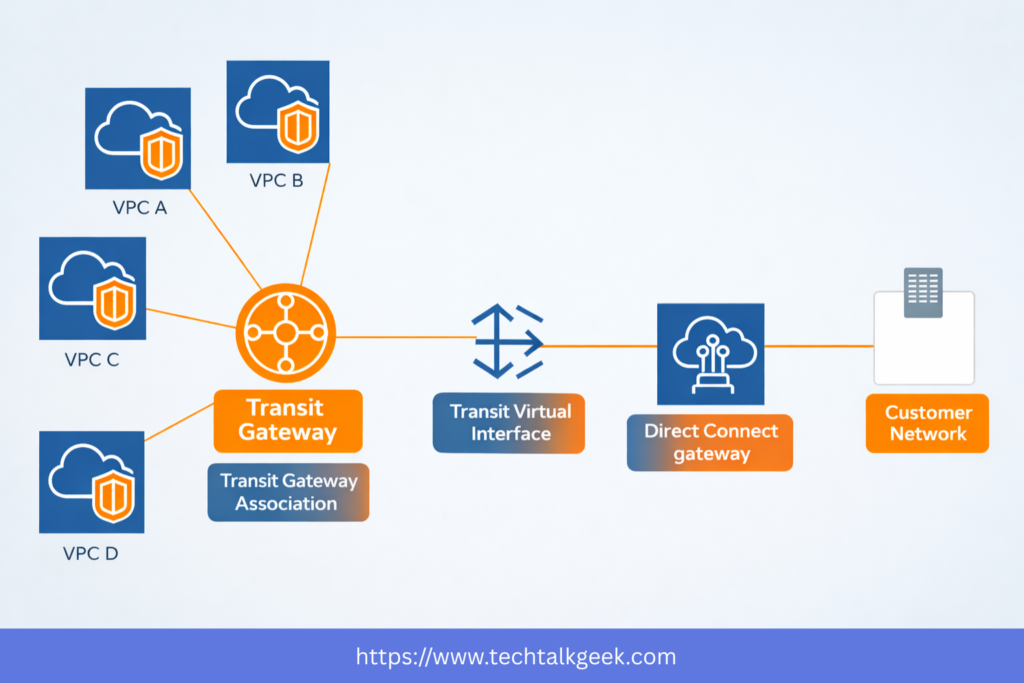
    AWS Direct Connect Gateway architecture diagram connecting on-premises infrastructure to multiple VPCs across AWS Regions
    Direct Connect Gateway helps extend one Direct Connect setup to multiple VPCs and AWS Regions.

    If you tried to connect your on-premises network to each VPC individually, your architecture would quickly become messy. This is where the Direct Connect Gateway becomes important. AWS also explains how AWS Direct Connect Gateway helps scale connectivity across multiple VPCs and Regions.

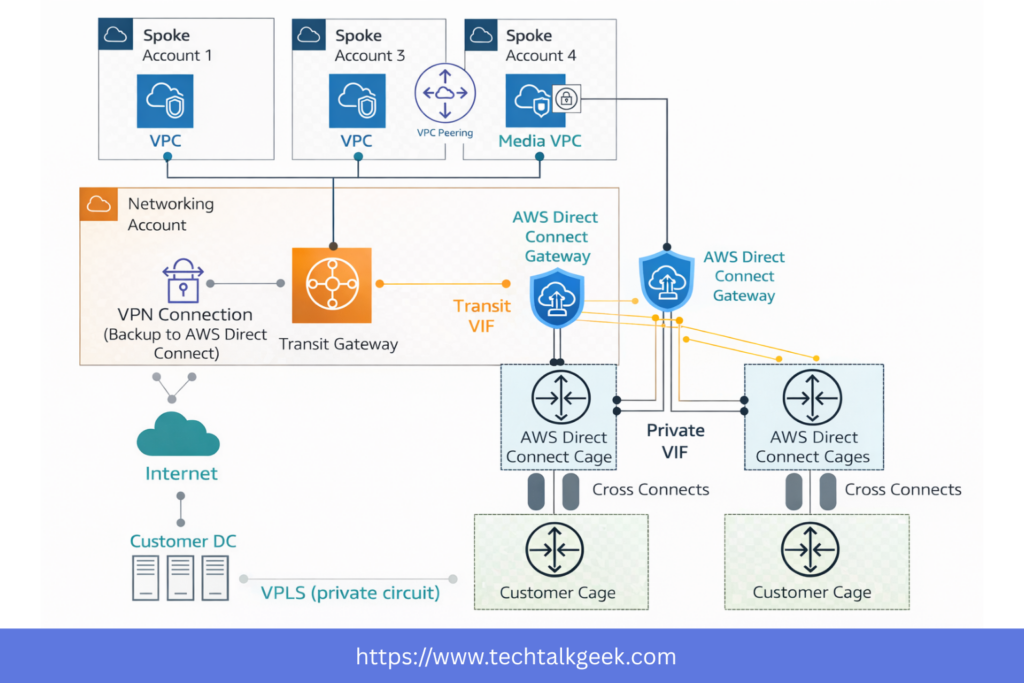
    A Direct Connect Gateway allows you to extend your Direct Connect setup to multiple VPCs and multiple regions more cleanly. Instead of creating isolated, one-off designs, it provides a more scalable hybrid connectivity model.

    This becomes especially valuable in larger AWS environments where networking needs to be centralised and manageable. In those scenarios, AWS Transit Gateway is often used together with Direct Connect to simplify routing across multiple VPCs. It helps organisations avoid duplicate connectivity patterns and provides a more elegant way to connect enterprise infrastructure to AWS at scale.

    If you want the simple explanation, here it is: Direct Connect Gateway helps one Direct Connect setup reach more of your AWS environment without creating networking chaos.

    Concept 5: VPN and Direct Connect Are Not Competitors — They Often Work Together

    A common beginner mistake is treating Direct Connect vs. VPN as a simple either-or decision. In reality, many strong architectures use both together.

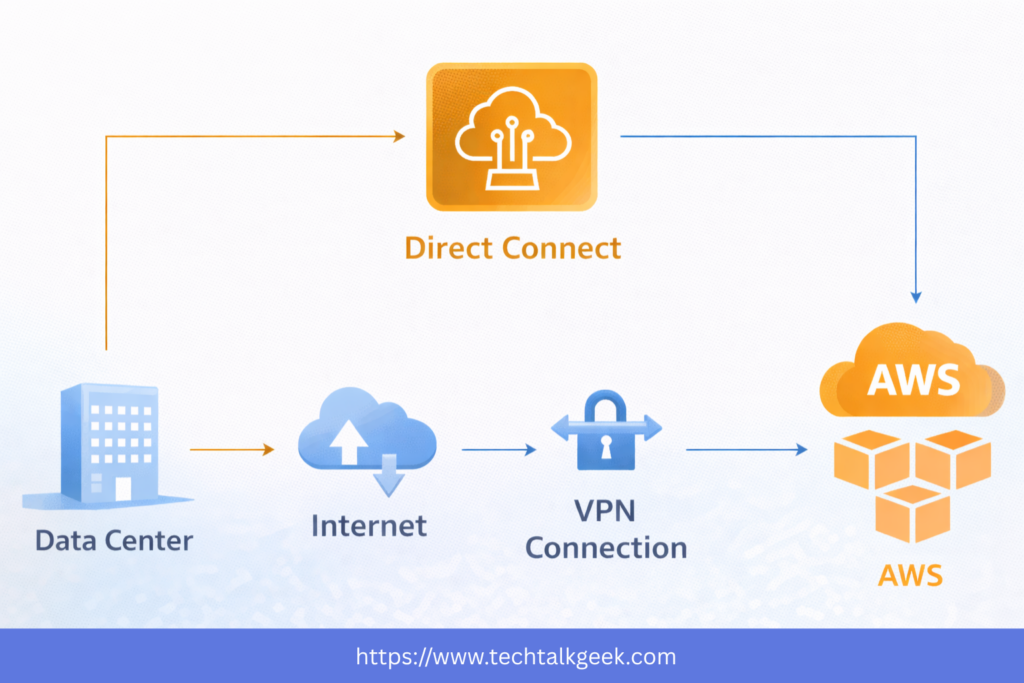
    AWS Direct Connect vs VPN comparison diagram showing differences in private connectivity, encryption, and hybrid networking
    Direct Connect offers private dedicated connectivity, while VPN provides encrypted connectivity over the internet.

    A Site-to-Site VPN is often faster to deploy and provides IPsec encryption over the Internet. If you’re new to hybrid connectivity, reviewing AWS Site-to-Site VPN alongside Direct Connect can make the differences much clearer. Direct Connect, on the other hand, gives you a private, dedicated path with more consistent performance. Each solves a different problem.

    This is where many organisations get caught out: Direct Connect is not encrypted by default. It is private, but that does not automatically mean it is encrypted. That distinction matters a lot for compliance, security requirements, and real-world architecture.

    That’s why many businesses run a VPN over Direct Connect. This gives them the best of both worlds: the stable, dedicated network path of Direct Connect, combined with VPN encryption.

    AWS Direct Connect private VIF vs public VIF diagram showing access to VPC resources and AWS public services
    Private VIF connects to AWS VPC resources, while Public VIF connects to AWS public services such as Amazon S3.

    So the smarter question is not always “Should I use Direct Connect or VPN?” Often, the better question is: Should I combine them based on my requirements?

    That shift in thinking is what separates memorisation from architecture.

    Concept 6: Direct Connect Is Powerful, But It Has Real Trade-Offs

    One of the biggest mistakes people make is assuming Direct Connect is automatically the best option because it sounds more “enterprise.”

    It isn’t.

    AWS Direct Connect has real strengths, but it also comes with real trade-offs. It often involves physical provisioning, partner coordination, networking hardware, and setup lead times. In many cases, it can take weeks or even longer than a month to establish.

    That means Direct Connect is usually a poor choice when a company needs a solution immediately. If the business needs hybrid connectivity this week and Direct Connect does not already exist, a VPN may be a more practical option.

    It’s also important to remember that not every workload needs this level of networking sophistication. If your traffic is small, your connectivity needs are light, or your environment is still early in its cloud journey, Direct Connect may be unnecessary complexity.

    Good architecture is not about choosing the most impressive service. It’s about choosing the service that actually fits the requirement.

    That means Direct Connect is at its best when the problem is large enough, important enough, and long-term enough to justify the operational and architectural investment.

    Concept 7: Resiliency Is Where Direct Connect Becomes Real Architecture

    The final concept — and arguably the most important one — is resiliency.

    Many beginner explanations make Direct Connect sound like a single connection you set up and forget. That is not how critical infrastructure should be designed.

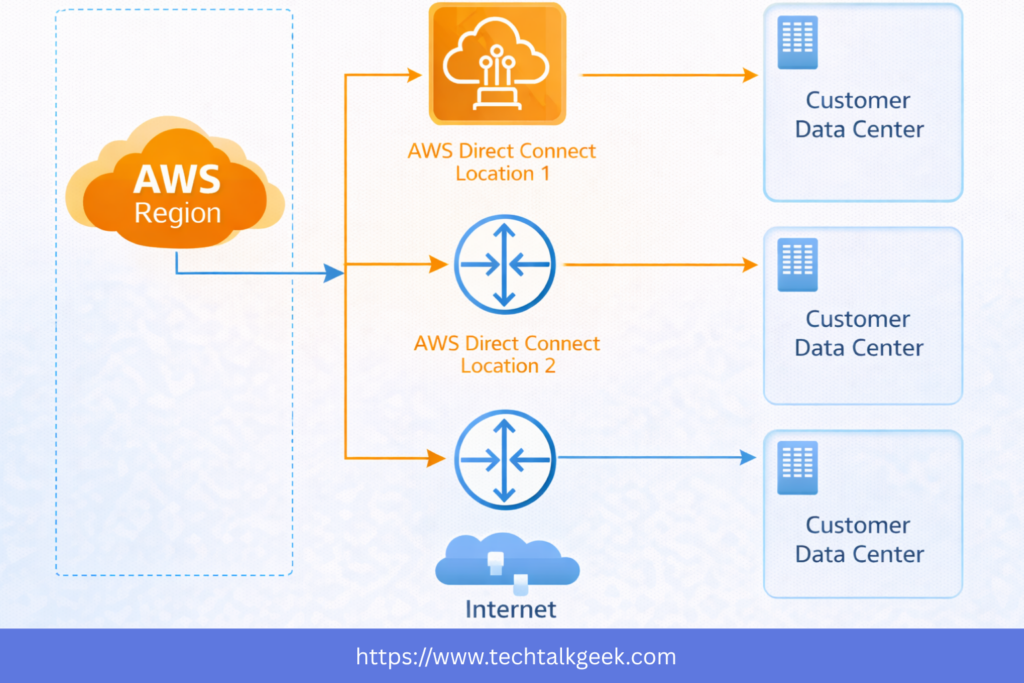
    AWS Direct Connect resiliency architecture diagram showing redundant connections across multiple locations
    A resilient AWS Direct Connect design uses multiple connections and locations to reduce failure.

    If your business depends on hybrid connectivity, then your network path itself becomes a critical dependency. And critical dependencies must be designed with failure in mind.

    What happens if a circuit fails? What happens if a router fails? What happens if a Direct Connect location has an issue?

    This is why resilient Direct Connect design often involves multiple connections across multiple locations. The goal is not just to “have a backup.” The goal is to reduce single points of failure and avoid a single issue taking down your hybrid architecture.

    This is where AWS networking starts to become true architecture rather than just service memorisation. You stop asking, “Do I have Direct Connect?” and start asking, “Have I designed for failure?”

    That’s a much more valuable question.

    And in many production-grade environments, that’s also where VPN plays an important secondary role — as a failover or backup path in case your Direct Connect path becomes unavailable.

    So if you want to think like an architect, don’t just learn Direct Connect as a service. Learn it as part of a resilient hybrid connectivity strategy.

    When Should You Actually Use AWS Direct Connect?

    Once you understand these seven concepts, the next question becomes much easier: when should you actually use AWS Direct Connect?

    Direct Connect makes sense when your organisation needs consistent, private, high-value connectivity between on-premises infrastructure and AWS. It is especially useful for long-term hybrid workloads, high-throughput data transfer, enterprise integration, and environments where network predictability matters.

    It is also highly relevant when you need to connect your business environment to multiple AWS VPCs and regions, especially as your architecture grows beyond a simple one-VPC design.

    But Direct Connect is not always the right answer. If your organisation needs connectivity quickly, requires encryption immediately, or has only light networking demands, then a VPN may be the more practical option.

    This is the real lesson: AWS Direct Connect is not impressive because it is private. It is impressive when it is justified.

    Final Thoughts About AWS Direct Connect

    The real skill is not knowing that AWS Direct Connect exists. The real skill is knowing when it creates value, when it creates unnecessary complexity, and when it hides a deeper design problem you should solve instead.

    If you need private access to AWS VPC resources, think Private VIF. If you need access to AWS public services like S3, think Public VIF. If you need to scale across multiple VPCs and regions, think Direct Connect Gateway. If you need encryption or failover, think VPN alongside Direct Connect. And if you need resilience, think in terms of failure domains, not just extra cables.

    That’s the mindset that turns AWS networking knowledge into real cloud architecture skills.